Visual regression
A CSS change that looks harmless in 1 component can shift the layout of a
page you never opened, and no unit test notices. Visual regression testing
catches that kind of bug by comparing screenshots. Vortex ships an
optional GitHub Actions workflow that uses Diffy to compare a
deployed environment with a baseline, production by default. It writes
the result to the workflow run summary and, for a deployment that belongs
to a pull request, also posts it on the pull request.
This page is for the lead or DevOps engineer who sets up visual regression on a project built from Vortex. It covers the Diffy account, the repository and hosting configuration, the ways to start a comparison and how the workflow decides which deployments to compare. For the notification channel's own variables, see Diffy notification channel.
The installer adds the .github/workflows/test-vr.yml workflow when you
answer yes to its Visual regression testing with Diffy? question, which
defaults to no. To add the workflow to a project installed without it, run
ahoy update-vortex --interactive and answer yes to that question. That
run also updates the rest of the project's Vortex files, as
Updating Vortex describes. The workflow runs on
GitHub Actions whichever CI provider builds the project, so it needs the
repository on GitHub.
Diffy
Diffy is a hosted visual regression testing service. It captures screenshots of the pages you list in a Diffy project, at each breakpoint width you configure. It then compares them with a baseline: another environment or a saved screenshot set. A web UI shows the differences page by page.
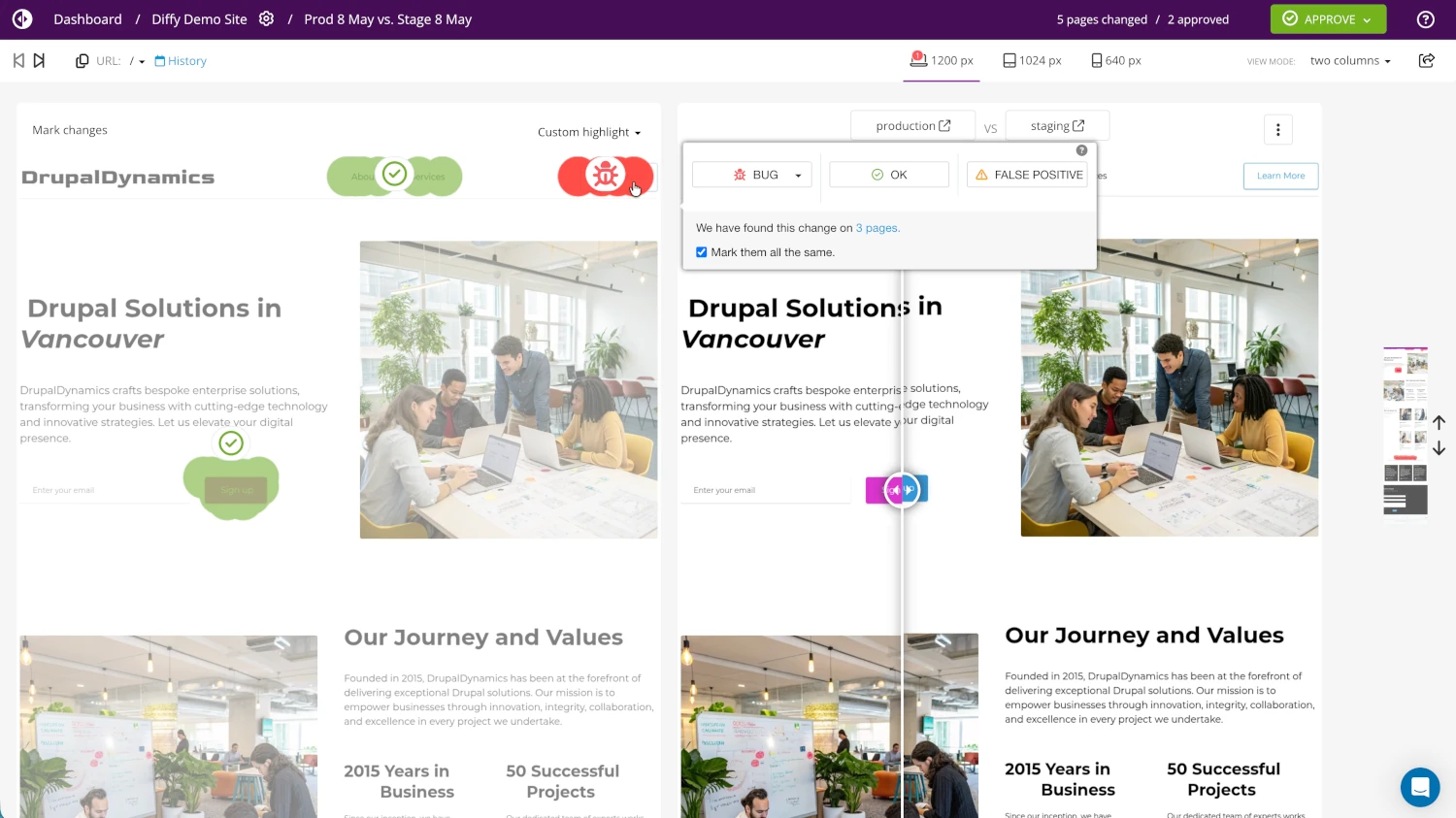
The following Diffy features matter for this workflow:
- You can compare 2 environments of a project, or an environment with a custom URL or a saved baseline.
- Each comparison runs at every breakpoint width configured in the project.
- Diffy reports the percentage of change for each page and breakpoint.
- You can mask, remove or replace elements before Diffy takes the screenshots, which suits ads, cookie banners and content that changes on every visit.
- Any CI runner or shell script can drive the
diffy-cliPHAR. - Diffy also has an API, which the CLI calls with your API key.
Account setup
Before you turn the workflow on, set up a Diffy project for the site:
- Create an account in the Diffy app.
- Create a project for the site.
- In the project settings, enter the
productionenvironment URL. - Optional: Enter the
staginganddevelopmentenvironment URLs too, so you can compare against them. - Generate an API key on the API keys page of your Diffy profile.
The numeric project ID appears in the Diffy project URL. The workflow reads
it from the VR_DIFFY_PROJECT_ID repository variable. Confirm that you
have both the project ID and the API key before you configure the
repository.
Repository configuration
The shipped test-vr.yml workflow reads its configuration from GitHub
Actions secrets and repository variables.
Secrets
The workflow reads the following secrets:
| Name | Required | Purpose |
|---|---|---|
VR_DIFFY_API_KEY | yes | Diffy API key |
VR_SOURCE_HTTP_USER | no | HTTP basic authentication user for the Diffy source environment (set when it sits behind basic authentication, such as the Shield module or an htpasswd file) |
VR_SOURCE_HTTP_PASS | no | HTTP basic authentication password for the Diffy source environment |
VR_TARGET_HTTP_USER | no | HTTP basic authentication user for the deployed target environment (typically the PR environment) |
VR_TARGET_HTTP_PASS | no | HTTP basic authentication password for the deployed target environment |
Add them in your repository as repository secrets, under Settings > Secrets and variables > Actions.
Both credential pairs are optional: leave a pair unset when its environment is publicly reachable. When both values of a pair are set, the workflow passes the pair to Diffy on every comparison, so Diffy sends them as HTTP basic authentication credentials.
Vortex forces the Shield
module on in dev and stage environments, pull request environments
included, unless the environment sets DRUPAL_SHIELD_DISABLED=1. For those
targets, set the target pair to the environment's DRUPAL_SHIELD_USER and
DRUPAL_SHIELD_PASS values.
You can keep the source credentials in the Diffy project instead, as part of
the environment URL in the https://user:password@host form. The secrets
suit hosting that rotates its credentials, where updating the Diffy project
each time is impractical.
Diffy captures screenshots from the IPv4 address 138.201.56.149 and the
IPv6 address 2a01:4f8:172:1189::2. The source or target environment might
sit behind a web application firewall (WAF) or a content delivery network
(CDN), such as Cloudflare, AWS CloudFront, Akamai or Incapsula. That layer
can then block or challenge Diffy's requests, and Diffy captures the block
or challenge page instead of the real site. The comparison then reports
differences that have nothing to do with your code.
Allowlist both addresses in that layer so Diffy's requests reach the site. In Cloudflare, add an IP Access Rule with the Allow action for each address. For the addresses as Diffy publishes them, and for the Akamai and Incapsula steps, see Diffy's bypass protection guidance.
Variables
The workflow reads the following repository variables:
| Name | Default | Purpose |
|---|---|---|
VR_DIFFY_PROJECT_ID | None (required) | Numeric Diffy project ID (visible in the Diffy project URL) |
VR_DIFFY_CLI_VERSION | 0.1.53 | Pinned diffy-cli release used by vr-compare |
VR_DIFFY_MAX_WAIT | 2700 | Maximum seconds to wait for a comparison to complete (45 minutes) before vr-compare fails |
VR_DIFFY_POLL_INTERVAL | 30 | Seconds between comparison status checks |
VR_DIFFY_PR_LABEL | VR | PR label that opts a deployment into visual regression. Case-insensitive |
VR_DIFFY_PR_SKIP_BRANCHES | deps/* | Comma-separated glob list of PR head branches that skip the label gate (matches Renovate's branchPrefix). An empty value falls back to deps/*. |
VR_DIFFY_BRANCHES | None | Comma-separated glob list of deployed branches that run visual regression when the deployment has no pull request (for example release/*). Empty means such deployments never run. |
Add them under Settings > Secrets and variables > Actions too, as repository variables.
The workflow treats an empty variable as unset, so every variable with a
default falls back to it. The Diffy source environment comes from
VORTEX_NOTIFY_DIFFY_SOURCE_ENV on deployments and from the source_env
input on manual runs. Both default to production.
Deployment-side configuration
Automatic runs start on the hosting side. After a deployment, the host hook
(Lagoon's post-rollout tasks or Acquia's post-code-deploy hook) runs the
notification router. Its diffy channel then sends GitHub a
repository_dispatch event that starts the workflow.
That request needs a GitHub token with repo scope in
VORTEX_NOTIFY_DIFFY_TOKEN, set in the hosting environment. It falls back
to VORTEX_NOTIFY_GITHUB_TOKEN, then to GITHUB_TOKEN. Set the repository
in owner/repo form in VORTEX_NOTIFY_DIFFY_REPOSITORY, also in the
hosting environment, which falls back to VORTEX_NOTIFY_GITHUB_REPOSITORY.
The channel stays off until you add diffy to VORTEX_NOTIFY_CHANNELS,
which lists only email by default. Set it in the committed .env file,
for example:
VORTEX_NOTIFY_CHANNELS=email,github,diffy
The diffy channel skips the pre-deployment notification, because the
environment isn't ready for screenshots yet, and dispatches on the
post-deployment notification. See the Diffy notification
channel for the channel's
variables.
Confirm that the next deployment's log shows
[ OK ] Finished Diffy notification., and that a
Test - Visual regression run appears on the repository's Actions
tab.
Trigger a comparison
The workflow has 2 entry points, and neither entry point blocks a merge, as Make the check blocking explains.
1. Automatic on deployments
The following diagram traces an automatic run from a push to the pull request comment:
┌─ GitHub ────────────────────────────────────┐
│                                             │
│         PR opened or branch pushed          │
│                  │                          │
│                  ▼                          │
│           build-test-deploy.yml             │
│                                             │
└────────────────────┬────────────────────────┘
                     │
                     ▼
┌─ Hosting environment ───────────────────────┐
│                                             │
│       Hosting provider deploys async        │
│                  │                          │
│                  ▼                          │
│            Host post-deploy hook            │
│                  │                          │
│                  ▼                          │
│                notify router                │
│                  │                          │
│                  ▼                          │
│            notify-diffy channel             │
│                                             │
└────────────────────┬────────────────────────┘
                     │
                     ▼
┌─ GitHub ────────────────────────────────────┐
│                                             │
│      repository_dispatch (vr_run)           │
│                  │                          │
│                  ▼                          │
│             test-vr.yml workflow            │
│                  │                          │
│                  ▼                          │
│      vr-compare: parse PR from URL, gate    │
│                  │                          │
│         ┌────────┴────────┐                 │
│         ▼                 ▼                 │
│   PR deployment      no PR resolved         │
│         │                 │                 │
│         ▼                 ▼                 │
│    VR label or        branch in             │
│   PR skip list       branch list            │
│         │                 │                 │
│         └────────┬────────┘                 │
│                  ▼                          │
│        Report in workflow run summary       │
│                  │                          │
│                  ▼                          │
│             vr-report (PR only)             │
│                  │                          │
│                  ▼                          │
│        PR comment + Diffy report link       │
│                                             │
└─────────────────────────────────────────────┘
The dispatch payload carries the branch, the target URL, the label and the
source environment, but no PR number or commit SHA. The workflow finds the
PR itself by matching the pr-<number> segment in the deployed URL, so
https://pr-123.example.com/ resolves to PR #123. It then runs only when
that PR has the VR_DIFFY_PR_LABEL label (VR by default, matched
case-insensitively) or a head branch that matches
VR_DIFFY_PR_SKIP_BRANCHES. See How the PR is
resolved for URLs without that segment.
2. Manual on any URL
The following diagram traces a manual run:
┌─ GitHub ────────────────────────────────────┐
│                                             │
│      Operator opens GitHub Actions UI       │
│                  │                          │
│                  ▼                          │
│  Run 'Test - Visual regression' workflow    │
│                  │                          │
│                  ▼                          │
│  Provide source_env + target_url + label    │
│                  │                          │
│                  ▼                          │
│              vr-compare job                 │
│                  │                          │
│                  ▼                          │
│        Report in workflow run summary       │
│                                             │
└────────────────────┬────────────────────────┘
                     │
                     ▼
┌─ Diffy ─────────────────────────────────────┐
│                                             │
│            Result in Diffy UI               │
│                                             │
└─────────────────────────────────────────────┘
Use this entry point for an ad-hoc comparison against any URL. To start a manual run:
- On the repository's Actions tab, select the Test - Visual regression workflow.
- Click Run workflow. A form with the workflow's inputs opens.
- Optional: To compare against an environment other than
production, enterstagingordevelopmentin Diffy source environment (production, staging, development). - Enter the URL to compare in Target URL to compare against.
- Optional: To give the diff its own name in the Diffy UI, replace
manualin Diff label shown in Diffy UI. - Click Run workflow in the form. The new run appears in the workflow's list of runs.
Confirm that the run's summary page shows a Visual regression report with the number of changed pages and a View full Diffy report link.
A manual run always passes the gate, and its result lands in the workflow
run summary and in the Diffy UI. If the target URL has a pr-<number>
segment, the workflow resolves that PR as usual, and vr-report posts the
result on it as a comment.
Limit which branches dispatch
With the diffy channel on, every post-deployment notification dispatches
the workflow, and the workflow's gate decides whether a comparison runs. A
dispatch that the gate skips still starts a short workflow run.
To stop those dispatches at the source and save GitHub Actions minutes, set
VORTEX_NOTIFY_DIFFY_BRANCHES to a comma-separated allowlist of branch
names. On any other branch, the host hook skips the dispatch with a
Skipped Diffy notification message, and the deployment continues. Write
the exact branch names, with no spaces around the commas and no glob
patterns, which work only in the workflow's branch variables.
The allowlist filters PR deployments too, because a PR environment reports its head branch. An exact-name list would need every feature branch on it. Leave the variable empty, the default, to let the workflow's gate decide.
Automated dependency PRs
Renovate and other dependency-update bots open PRs with their own label in
place of VR (Vortex's Renovate configuration applies Dependencies).
Those PRs still need a visual check, because a dependency update can change
markup your team never touched. The workflow lets them past the label gate
by head branch: VR_DIFFY_PR_SKIP_BRANCHES holds a comma-separated glob
list of PR head branches that skip the label gate.
The default value is deps/*, which matches the branchPrefix in
Vortex's Renovate configuration. The following table lists the values
for common bots:
| Bot | Branch prefix | Suggested value |
|---|---|---|
| Renovate (Vortex default) | deps/ | deps/* |
| Renovate (default config) | renovate/ | renovate/* |
| Dependabot | dependabot/ | dependabot/* |
Combine patterns with commas:
VR_DIFFY_PR_SKIP_BRANCHES=deps/*,dependabot/*. An empty value falls back
to deps/*. To require the label on every PR, bot PRs included, set the
variable to a pattern that no branch matches, such as none.
Default behavior out of the box
With the default VR_DIFFY_PR_SKIP_BRANCHES=deps/* and
VR_DIFFY_PR_LABEL=VR, the gate decides as follows:
| PR head branch | Has VR label? | Runs? |
|---|---|---|
feature/header-redesign | yes | yes (label gate) |
feature/header-redesign | no | no |
deps/drupal-core-11.2 | no | yes (matches deps/*) |
deps/drupal-core-11.2 | yes | yes (matches deps/*, label irrelevant) |
Release and other non-PR deployments
Some deployments have no pull request: a release branch, an integration
branch such as develop or a permanent dev or stage environment. With
no pull request to carry the VR label, the workflow skips them by
default.
To compare them automatically, set the VR_DIFFY_BRANCHES repository
variable to a comma-separated glob list of deployed branch names:
VR_DIFFY_BRANCHES=release/*
The following table shows which deployments run for a few values:
| Deployment | VR_DIFFY_BRANCHES | Runs? |
|---|---|---|
PR environment (pr-123 in the URL) | any value | gated by the VR label and VR_DIFFY_PR_SKIP_BRANCHES as usual |
Branch release/1.2.3 | Not set | no |
Branch release/1.2.3 | release/* | yes |
Branch develop | release/* | no |
Branch develop | release/*,develop | yes |
| Any branch | * | yes (every non-PR deployment) |
The deployed branch arrives in the dispatch payload, so the workflow needs no GitHub API call to resolve it.
Patterns match the git branch name. Hosting providers sanitize branch names
for URLs, so Lagoon deploys release/26.7.5 to a host containing
release-26-7-5, but the gate still compares against release/26.7.5.
These runs have no pull request to comment on, so their result appears in the workflow run summary and in the Diffy UI.
How the PR is resolved
The workflow extracts the PR number from the deployed environment URL by
matching the pr-<number> segment. For example:
https://pr-123.example.com/         ->  PR #123
https://app.pr-42.example.com/      ->  PR #42
The host must deploy PR environments to a URL that contains the
pr-<number> segment. The URL is the single source of truth, so the host
never passes a PR number. Every hosting provider exposes the deployed
environment URL, so extracting the number works the same on every host. The
gate then reads the PR's labels and head branch with gh pr view. If no
pull request with that number exists in the repository, the lookup fails
and the workflow skips the run.
On Acquia, the notification hook reports
https://<site>.<realm>.acquia-sites.com, or the custom domain in
VORTEX_NOTIFY_ENVIRONMENT_DOMAIN (see
Acquia). A deployment there
resolves to a PR only when that URL contains the segment.
A target URL with no pr-<number> segment, such as a deploy to dev,
test or prod, counts as a non-PR deployment. The workflow then runs
only when the deployed branch matches VR_DIFFY_BRANCHES.
Missed-window behavior
Adding the label after a PR's deployment finishes starts no comparison, because the workflow runs on deployment dispatches only. That's deliberate: a late label shouldn't quietly launch a Diffy job against an environment that might be stale.
To run the comparison after you add the label, do either of the following:
- Push an empty commit to the PR branch. It triggers a new deployment and a new dispatch.
- Start a manual run against the PR environment's URL. The workflow resolves the PR from the URL, so the report still lands on the pull request.
Jobs
Runs for the same target URL share a concurrency group, so a newer deployment of an environment cancels the comparison still running against it.
The vr-compare job runs the following steps:
- Resolves the PR number from the target URL, then gates the run. A manual
run always proceeds. A PR deployment needs the label or a head branch
matching
VR_DIFFY_PR_SKIP_BRANCHES. A non-PR deployment needs its branch inVR_DIFFY_BRANCHES. - Fails if the target URL is empty, then installs the
diffy-clirelease fromVR_DIFFY_CLI_VERSIONand logs in withVR_DIFFY_API_KEY. - Calls
diffy project:compareto compare the source environment with the target URL, passing the label as the diff name, plus any HTTP credentials. - Polls the comparison status, printing progress to the job log every
VR_DIFFY_POLL_INTERVALseconds, and fails if the comparison doesn't finish withinVR_DIFFY_MAX_WAITseconds. - Fetches the diff result and exposes the diff ID, PR number, change percentage, page counts and shared report URL as job outputs.
- Renders the report into the workflow run summary, so the result is readable in the GitHub Actions UI without opening the job log.
Differences don't fail the job. vr-compare reports the change percentage
and the page counts, then succeeds at any value. It fails only in the
following cases:
- The target URL is empty.
- Diffy returns no diff ID.
- The comparison runs past
VR_DIFFY_MAX_WAIT. - A Diffy CLI call fails.
A failed status check counts as a comparison still in progress.
The vr-report job posts the same report as a comment on the PR, with a
link to the full Diffy report. Each new report hides the previous comment,
so stale results don't pile up on the PR timeline. The job runs only when
vr-compare succeeded without skipping and resolved a PR. It fails only
when it can't post the comment.
Opted-in branch deployments, and manual runs against a URL without a
pr-<number> segment, report through the run summary alone.
Make the check blocking
Visual regression results don't block merges, and a required status check
can't change that. GitHub runs a workflow that a repository_dispatch
event starts against the latest commit on the default branch. The
vr-compare check therefore lands on that commit, never on a pull
request's head commit.
Branch protection evaluates required checks on the head commit, so a
required vr-compare check leaves every pull request waiting for a status
that never arrives. Only a manual run started from the pull request's own
branch reports on its head commit.
Review the comparison in the comment that vr-report posts, or in the
Diffy report it links to, before you merge.
Costs and quotas
Diffy plans count screenshots per month, and every comparison captures each
page at each breakpoint. Frequent automated dispatches use up a plan, so
limit which branches trigger comparisons. Vortex's default gating keeps
the run rate low: only PRs with the VR label or a deps/* head branch
run, and non-PR deployments never run.
The following variables tune the gating to your team's review rhythm:
VR_DIFFY_PR_LABELVR_DIFFY_PR_SKIP_BRANCHESVR_DIFFY_BRANCHESVORTEX_NOTIFY_DIFFY_BRANCHES
Keep VR_DIFFY_BRANCHES as narrow as you can. A value of * compares every
non-PR deployment against the source environment, including each
deployment to dev or stage, so a busy integration branch spends quota
on every deployment.
Turn off visual regression
To switch visual regression off:
- Remove
diffyfromVORTEX_NOTIFY_CHANNELSin.env, and in any hosting environment that sets the variable itself. - Delete the
.github/workflows/test-vr.ymlworkflow file.
Confirm that the next deployment's log has no Started Diffy notification.
line.
Re-running the installer and answering no to its
Visual regression testing with Diffy? question removes the workflow file
for you. The diffy channel itself ships in the drevops/vortex-tooling
package, so it stays installed but inactive while VORTEX_NOTIFY_CHANNELS
doesn't list it.